How AI Employees Help Nonprofit Volunteer Coordinators Recruit, Schedule, and Keep Great Volunteers

Title: Volunteer Coordinator Welcomes Volunteers
Caption: A warm welcome helps volunteers feel ready to take part.
Description: A volunteer coordinator greets several adults at a community center. The group is gathered around a table with clipboards.
For a small nonprofit, volunteer coordination can feel like a job made of a hundred small jobs: answering inquiries, checking forms, filling shifts, sending reminders, recording hours, and remembering to say thank you.
AI employees can help with some of that coordination work. They can draft replies, organize information, prepare schedules, and flag tasks that need attention. The coordinator still makes decisions and builds the relationships that keep volunteers coming back.
AI handles repeatable work. People make volunteering meaningful.
How AI Can Support the Volunteer Journey
Think of an AI employee as a digital assistant for routine tasks, not a volunteer manager who makes decisions on its own. It might help organize an inbox, prepare message drafts, summarize availability, or create a report for a person to check. The exact tasks depend on the tools your nonprofit approves and the way your team works.
This can help a food pantry manage weekly shifts, an animal shelter coordinate care teams, or a senior center follow up after an event. The purpose is the same: spend less time chasing details and more time helping people feel prepared, welcome, and valued.
At Aimee’s Marketing, AI helps create blog drafts, organize research, improve marketing campaigns, and assist with customer communication. Rather than replacing people, AI allows us to spend more time serving clients and developing new ideas.
1. Respond to Volunteer Inquiries and Applications
A quick, clear response can help a person take the next step. But when a small team is busy, an inquiry can sit unanswered.
AI can help by:
- Drafting replies to common questions about roles, hours, location, or orientation.
- Sending a reminder when an application is incomplete.
- Summarizing a volunteer’s stated interests and availability for a coordinator to review.
- Preparing a welcome message with the next steps.
Keep the first exchange personal and accurate. Have a staff member review drafts, especially when a question is unusual or concerns access, accommodations, safety, or a person’s private circumstances. Give people a clear way to reach a human.
2. Make Onboarding Easier to Follow
Onboarding often includes several steps: an orientation, a role description, policies, training, and forms. AI can help make a checklist, send reminders about missing items, and share approved information in a clear order.
For example, an animal shelter might use a checklist for training on safe animal handling. A youth mentoring program might have separate onboarding steps for mentors, including required human-led screening and training. AI can remind the coordinator that a step is incomplete. It should not decide that a person has passed screening or is ready to work with young people.
Set a simple rule: AI may track steps, but people approve readiness.
NCVO’s volunteer recruitment guidance explains why roles with greater safeguarding risks may need more formal selection steps. Requirements depend on the role and local rules, so define them with your organization’s safeguarding lead.
3. Draft Schedules and Fill Open Shifts
Scheduling is a good place to start with AI because it often involves repeatable tasks and clear information. A coordinator might use AI to organize availability, prepare a draft rota, spot uncovered shifts, or draft reminders.
A tablet or calendar view can help the coordinator review possible matches before confirming a volunteer’s shift.

Title: Coordinator Reviews a Volunteer Schedule
Caption: A draft schedule is useful when a coordinator checks it before confirming shifts.
Description: A coordinator and volunteer look at a tablet together at a community center. No personal details appear on the screen.
When a last-minute gap opens, AI can help sort volunteers by the availability and preferences they have shared, then draft a message asking who can help. The coordinator should approve the list and send the request through an appropriate channel. Don’t let an automated system assign people to sensitive roles or make assumptions about who is available.
Use a brief, respectful reminder with the key details: date, time, location, role, and how to cancel or ask a question. More messages are not always better. Ask volunteers what reminders they prefer.
Our article on how AI employees help local service businesses stay booked looks at routine scheduling and follow-up in another setting. The lesson also applies to nonprofits: timely communication helps people know what to expect, but a human should handle special circumstances.
4. Recognize Volunteers and Ask for Feedback
A generic thank-you can feel like an afterthought. AI can help draft a message that refers to a volunteer’s role or milestone, but the coordinator should check that it is correct and add a personal note when possible.
A volunteer team huddle is a simple way to check in, share updates, and show people that their time matters.
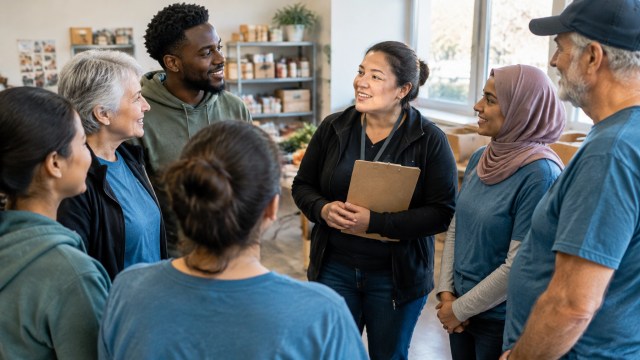
Title: Volunteers and Coordinator Gather for a Team Huddle
Caption: A quick check-in gives volunteers a chance to connect and ask questions.
Description: Volunteers of different ages and backgrounds meet with their coordinator in a community space before a shift.
AI can also draft a short feedback survey or group common themes from responses. Ask practical questions, such as:
- Did you have the information you needed before your shift?
- Did the role match what you expected?
- What would make your next shift easier?
- Is there anything you would like the coordinator to know?
Feedback should go to a person who can respond. If a volunteer raises a safety concern, describes a conflict, or shares a sensitive matter, send it to the right staff member rather than treating it as routine survey text.
5. Track Volunteer Hours and Prepare Board Reports
Accurate hour records can help a nonprofit understand its capacity and report on its work. AI may help organize submitted hours, flag missing entries, or prepare a draft summary for the board. A staff member should verify totals and definitions before sharing a report.
A useful volunteer report may include:
- Hours by program, role, or location.
- Number of active and returning volunteers.
- Shifts filled and shifts left open.
- Training or orientation completion.
- Volunteer feedback themes and follow-up actions.
Hours show effort, but not the full effect of a program. Pair them with relevant service details where you can. For example, show volunteer hours alongside the number of pantry shifts staffed or mentoring sessions held. Explain how your organization counts time, and correct errors before the report is approved.

Title: Nonprofit Team Reviews Volunteer Hours
Caption: A person checks the records before sharing a report with the board.
Description: Two team members review a volunteer-hours report at a table. The paperwork and laptop show no readable personal details.
Keep People, Privacy, and Safeguarding in Control
AI can make mistakes. It may draft a message with the wrong detail, miss the meaning of a reply, or suggest an unsuitable volunteer match. Review its work, and make it easy for a volunteer to correct information or contact a person.
Volunteer records may include contact details, availability, screening records, or other private information. Never enter volunteer private data into an unapproved tool. Check your organization’s privacy rules and the tool’s terms before connecting accounts or sharing information. Collect only what you need, limit access, and set a clear process for storing and deleting records. Google for Nonprofits’ responsible AI guidance is a useful starting point for thinking about privacy and safe use.
Safeguarding decisions must stay human. A trained person, not AI, should review screening, concerns about safety, suitability for a sensitive role, and any situation that calls for judgment. As NCVO’s guidance on data protection and volunteers notes, volunteer information needs careful handling.
Helpful beats flashy. A small, well-checked workflow is better than automating a high-stakes decision.
Start With One Small Workflow
Choose a task that repeats often and has a clear review step. For example, you could test AI on orientation reminders, shift confirmation drafts, or a monthly summary of approved volunteer hours.
- Map the steps. Write down what happens now, what information is needed, and who checks the result.
- Set limits. List what AI may draft or organize, and what it may not decide or send.
- Test safely. Use sample information or an approved system. Keep private data out of unapproved tools.
- Ask volunteers and staff. Check whether the new process feels clear, useful, and respectful.
- Review the results. Track whether the task takes less time without adding errors or making communication feel less personal.
For a broader introduction, read how to hire your first AI employee. You can also explore our guide to using AI employees while keeping a nonprofit focused on community service.
Simplified Summary
What is this article about?
It explains how AI can help nonprofit teams with volunteer messages, onboarding, schedules, hour records, and feedback.
Why should I care?
These tasks take time. AI can help coordinators spend more of that time supporting volunteers and their programs.
How do I do it?
Start with one repeated task. Use approved tools, check the work, and keep private information safe.
What is the main goal?
The goal is to reduce coordination busywork while keeping people in charge of relationships, safety, and important decisions.
Take the Next Step
Pick one volunteer task your team repeats every week. Decide what AI can prepare and what a person must review.
Explore AI employees, Get started here. If you help others learn about Marblism, Apply here to become a partner.


