How AI Employees Help Nonprofit Marketing Teams Reach More People on a Small Budget

- Title: Nonprofit Team Planning a Marketing Campaign
- Caption: A small team can use AI to organize routine marketing work and reach more people.
- Description: Three nonprofit staff members plan a campaign together in a bright office. They review a calendar, notes, and a laptop.*
A small nonprofit marketing team may be responsible for social media, newsletters, event promotion, volunteer messages, and community stories. All while keeping costs low. When the same people also support programs and answer day-to-day questions, marketing can feel like a job for a much larger team.
An AI employee is a role-based digital worker with clear tasks and limits. It can help prepare routine work, such as a content calendar or email draft, for a person to review. AI handles repetitive work while people handle judgment, relationships, and leadership.
Why Nonprofit Marketing Is a Good Fit for AI Employees
Nonprofit marketing includes many repeatable tasks. A team might share event updates across several channels, turn a program announcement into a newsletter, or prepare volunteer reminders. AI can help organize and draft these materials from information the nonprofit has approved.
That can make a small team’s effort go further without losing sight of the mission. Staff still choose the message, check the facts, and talk with the community. Helpful beats flashy.
Start with one clear workflow, not a plan to automate everything. Our plain-English guide to AI employees explains how role-based digital workers fit into everyday tasks. For more ideas about keeping resources focused on service, see how AI employees can help nonprofits stay on budget.
Five Practical Examples for Nonprofit Marketing
1. Community Food Program: Turn One Update Into a Week of Posts
A neighborhood food program shares weekly updates about pantry hours, volunteer needs, and food distribution. An AI employee can turn an approved program update into a draft social post, a short newsletter item, and a reminder for volunteers.
A staff member checks that hours and service details are correct before anything goes out. The team can then spend less time reformatting the same information and more time welcoming people at the program.
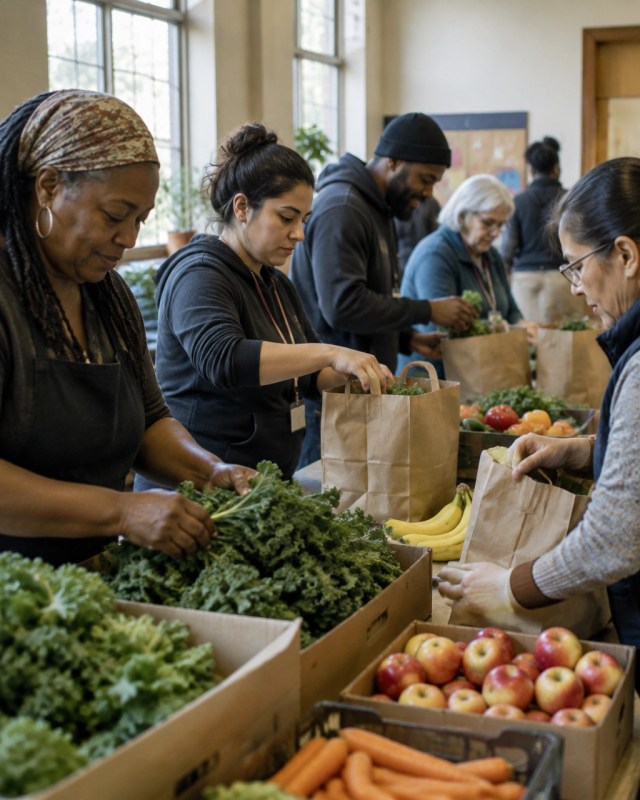
- Title: Community Food Program Volunteers at Work
- Caption: AI can help prepare routine outreach while staff stay present with the community.
- Description: Volunteers and staff work together to prepare food bags in a welcoming community space.*
For more food program ideas, read how AI employees help food banks and community nonprofits serve more families.
2. Church: Make Event Outreach Easier to Coordinate
A church outreach team is planning a community meal and a volunteer day. An AI employee can organize a simple content calendar, prepare draft event posts, and write a reminder email for volunteers. It can also make shorter versions of approved event details for social channels.
The outreach lead should confirm the details, make sure the tone feels welcoming, and answer personal questions. AI can help with consistency. People create the sense of welcome.
3. Education Nonprofit: Share Learning Resources in Useful Formats
An education nonprofit runs after-school learning sessions and sends updates to families, volunteers, and community partners. An AI employee can help turn an approved lesson or program update into a newsletter draft, a short social post, and a list of common questions for the website.
Staff can review each version for clear language and make sure it works for the audience. The same workflow can help a small nonprofit serving teachers or adult learners share information without writing every message from scratch.

- Title: Nonprofit Staff Review Outreach Materials
- Caption: A human review helps keep AI-assisted messages clear and useful.
- Description: Two nonprofit staff members check a newsletter draft and outreach checklist in a bright room.*
4. Healthcare Nonprofit: Prepare Clear, Reviewed Health Messages
A healthcare nonprofit shares general information about services, community workshops, and prevention resources. An AI employee can help turn approved public information into a draft event announcement or a plain-language FAQ.
A qualified staff member must review health content before publication. The AI should not handle private patient details or answer personal medical questions. For guidance on protecting resources while expanding community impact, see how executive directors can use AI employees.
5. Nonprofit and Consultant: Keep Content Moving Between Meetings
A small nonprofit works with a consultant or agency for part of its marketing. The consultant gathers approved program updates, then uses an AI employee to prepare draft captions, newsletter sections, and a monthly content calendar. The nonprofit’s staff reviews stories and details before approving them.
This gives both sides a clearer process. The consultant spends less time on repetitive formatting, while nonprofit staff keep control of their voice and priorities.
A consultant who works with small organizations can also explore how AI employees help startup marketing teams do big-team work on a small budget. The same idea applies to a small business with one person managing marketing: use AI for draft work, then apply human judgment before publishing. That is practical AI for small business, too.
What AI Employees Should Never Own
AI can help prepare communications. It should not take final responsibility for sensitive work. Keep a person in charge of:
- Final say on sensitive client stories, including permission, dignity, and context.
- Donor relationships, especially personal questions or concerns.
- Sign-off on public statements or claims about the organization’s work.
- Private donor or client data. Do not place it in tools that are not approved for that use.
Give each AI tool only the information it needs. Set review steps before connecting it to email lists or publishing accounts. If your team is choosing between different setups, this guide to AI virtual assistants and AI employees can help clarify the options. And while this article is about marketing, nonprofits can read separately about AI employees and grant reporting.
Aimee’s View
At Aimee’s Marketing, AI helps create blog drafts, organize research, improve marketing campaigns, and assist with customer communication. Rather than replacing people, AI allows us to spend more time serving clients and developing new ideas.
That is the right goal for nonprofit marketing, too. An AI employee should give people time back, not remove the human care that makes community work matter. Clear beats clever.
A Practical 30-Day Starter Plan
- Days 1–3: Choose one task. Pick a repeat task, such as turning an approved program update into social drafts. Note how long it takes now.
- Days 4–7: Set the rules. Write down the task, what information the tool can use, what it must avoid, and who approves the final message.
- Week 2: Build a simple workflow. Give the AI an approved example, a short tone guide, and a clear audience. Ask it for drafts, not automatic publishing.
- Week 3: Test with a small batch. Review the drafts for accuracy, voice, accessibility, and privacy. Make changes to the instructions when needed.
- Week 4: Decide what to keep. Compare the time spent, quality of drafts, and staff experience with the old process. Keep the workflow only if it is useful and safe.
If your team wants to explore a role-based tool, you can learn more about Marblism AI employees. Begin with a task that is easy to review and keep a staff member responsible for the result.
Measure What Matters
Reach is useful, but it is not the whole story. Track a few measures your team can act on:
- Time saved on repeat marketing tasks
- Posts and newsletters published on schedule
- Response times to volunteer and community questions
- Volunteer sign-ups and event attendance
- Donor replies
- Staff hours returned to mission work
Check quality, too. Are messages accurate and clear? Do people still get personal help when they need it? AI productivity tools should support community relationships, not get in their way.
Simplified Summary
What is this article about?
It explains how AI employees can help small nonprofit teams with routine marketing work.
Why should I care?
AI can save staff time. That leaves more time for people, programs, and community service.
How do I do it?
Choose one repeat task. Give the AI clear rules. Check every message before it goes out.
What is the main goal?
The goal is to reach more people while keeping people in charge of trust, stories, and decisions.
Your Next Step
Pick one marketing task your team repeats each week. Write down the steps and decide who will check the work. Start small and see if the process helps.
- Hire AI Employees: Get started here
- Become a Marblism Partner: Apply here
Business PR News may earn a commission from affiliate links.


