How AI Employees Help Construction Businesses Win More Bids and Keep Projects on Schedule

Caption: A contractor and colleague review plans before work begins.
Description: A small construction business owner looks over project plans with a teammate beside a work truck. The job site is calm and organized.
A construction owner’s day can start with a bid deadline and end with unanswered client texts, a late subcontractor, and paperwork still waiting in the office.
AI employees can help handle some of that repeat admin. They can sort information, prepare drafts, send reminders, and keep routine updates moving. That gives owners and project managers more time to focus on the work that needs people: solving job-site problems, making decisions, and building client trust.
AI should support the crew, not replace it. Think of an AI employee as a digital assistant that follows your instructions and helps complete defined tasks. A human still needs to review important work.
How AI can help you respond to more bids
A bid is more than a price. It involves reading the request, checking plans and specifications, asking questions, collecting subcontractor quotes, and preparing a clear proposal. AI can help organize this process, especially when several opportunities arrive at once.
For example, an AI assistant could:
- Sort bid invitations and record due dates.
- Pull key details (such as the project address, scope, and submission requirements) into a checklist.
- Draft proposal language from your approved template.
- List missing information or questions to clarify.
- Prepare follow-up emails for subcontractors or prospective clients.
For an estimate, AI may help arrange cost items in a consistent format or flag gaps in the information you provide. But it should not invent quantities, prices, or scope. It can make mistakes when reading plans or comparing quotes.
The estimator owns the numbers. A qualified person should check takeoffs, labor and material costs, assumptions, exclusions, contingencies, and the final price. A human must also review bid and contract terms before anything is sent. The goal is to reduce paperwork time, not rush a risky bid out the door.
Keep subcontractor schedules and paperwork moving
A schedule depends on handoffs. If a trade is delayed, a delivery is missing, or a permit is still pending, the next task may be affected. AI can help track dates and follow-ups in one place so fewer details get lost in email or text threads.
An AI project coordinator could:
- Send reminders about upcoming work and ask subcontractors to confirm availability.
- Flag unanswered messages or overdue paperwork for a project manager.
- Track insurance certificates, permits, and other required documents.
- Keep a list of open RFIs and their next steps.
- Draft routine RFI questions from notes supplied by the project team.
AI should not decide how to resolve a technical question. For instance, an RFI about structural details, code, or safety needs a response from the appropriate qualified professional. The AI can help prepare and route the question, but it should not guess at the answer.
Industry software is moving in this direction. In October 2025, Procore announced new AI innovations for construction workflows, including tools related to daily logs and RFIs. That’s a sign that construction technology is starting to build AI into project tasks, not proof that every tool will fit every contractor. Read Procore’s announcement.
Improve client updates without adding more admin
Clients want to know what is happening, especially when a schedule changes. But returning calls and writing updates can be hard when the owner or project manager is on site.
AI can draft a clear response to a routine question, turn approved field notes into a daily status message, or remind the team to send an update. A receptionist-style AI may also help answer basic calls or gather a caller’s details. For example, Marblism lists AI support for phone calls and inbox and calendar tasks. Check its current features and integrations before relying on it for your construction workflow.

Caption: An office coordinator handles a client call and checks project paperwork.
Description: A construction office coordinator speaks on the phone while looking at a laptop and project documents. The setting is a small contractor’s office.
AI-generated messages should be checked before they go out, especially if they discuss delays, cost changes, warranties, or contract commitments. A useful rule is simple: AI may prepare the message, but a person approves it.
Make daily notes and punch lists easier to manage
Field notes are useful only if they are clear and easy to find later. A project manager can dictate a quick update, then use AI to turn it into a draft daily status note with completed work, open issues, and next steps. The manager checks that the summary is accurate before sharing it.
AI can also help keep a punch list organized. It might group items by room or trade, assign a proposed owner, and track whether each item is open, in progress, or complete. A person still needs to confirm the work was done correctly.
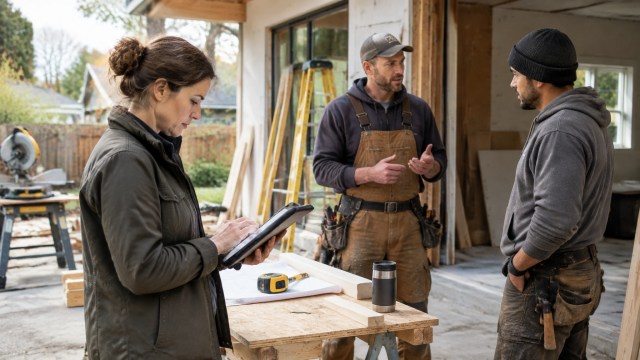
Caption: A project manager and subcontractors review work together.
Description: A project manager checks a tablet with two trade workers at a safe, tidy remodeling site.
This kind of support is most valuable when it matches a process your team already uses. If each worker records updates differently, the AI may create confusion instead of clarity. Start with one template for daily notes or punch lists, and make sure the crew knows where to submit information.
Start with one small workflow
You do not need to automate an entire construction business at once. Choose a task that happens often, follows clear steps, and does not require the AI to make a high-stakes decision.
- Pick a bottleneck. Examples include bid intake, client call-backs, subcontractor follow-ups, or collecting insurance certificates.
- Write down the steps. Note what information is needed, who approves the result, and when the task should be escalated.
- Set clear limits. Tell the AI what it may draft or organize, and what it must never send, approve, or decide.
- Test on a few jobs. Check the AI’s work against your normal process before expanding its role.
- Measure the change. Track response time, overdue paperwork, time spent on admin, or the number of missed follow-ups.
For more guidance, see our practical articles on hiring your first AI employee and how AI and human employees work best together.
At Aimee’s Marketing, AI helps create blog drafts, organize research, improve marketing campaigns, and assist with customer communication. Rather than replacing people, AI allows us to spend more time serving clients and developing new ideas.
What AI cannot do
AI can save time on repeat admin, but it cannot take responsibility for the job.
- It cannot walk a job site or see every condition that affects the work.
- It cannot inspect workmanship or confirm that a task meets the required standard.
- It cannot replace human judgment on safety. People on site must follow safety rules and use proper training and judgment.
- It can misread documents, miss details, or produce a confident but wrong draft.
Keep a human approval step for bids, contract terms, safety matters, technical answers, schedule commitments, and client messages that could create a promise. As Houzz’s 2025 construction and design AI survey notes, businesses using AI reported saving time on tasks, but results depend on the work and how the tools are used.

Caption: A small construction team wraps up a job-site conversation.
Description: A contractor, coordinator, and trade worker share a handshake at a tidy residential work site.
The best setup is a partnership: AI handles repeat reminders and first drafts; people make decisions, check the work, and build relationships. Helpful beats flashy. If an AI assistant gives your team fewer missed follow-ups and more time on site, it is doing a useful job.
Simplified Summary
What is this article about?
It explains how AI can help small construction businesses with bids, schedules, client updates, and paperwork.
Why should I care?
Less time on repeat admin can give you more time to manage projects and serve clients.
How do I do it?
Choose one task, give the AI clear rules, test it on a few jobs, and have a person check its work.
What is the main goal?
Let AI handle routine tasks so people can focus on good work, safe decisions, and strong client relationships.
Take the next step
Start by choosing one task that slows down your business. Review the tool’s features and limits before connecting it to your work.


